|
|
| |
|
|
| |
| ET-7000/PET-7000 Web based I/O module |
 |
|
|
| |
|
|
| |
|
|
| |
 |
The ET-7000/PET-7000, a web-based Ethernet I/O module, features a built-in web server which allows
configuration, I/O monitoring and I/O control by simply using a regular web browser. Remote control is as easy as surfing the Internet.
Besides, with the web HMI function, no more programming or HTML skills are required; creating dynamic and attractive web pages for I/O monitoring and I/O control would be fun to engineers ever after. The ET-7000/PET-7000 offers easy and safe access for users from anytime and anywhere! In addition, the ET-7000/PET-7000 also supports Modbus/TCP protocol that makes perfect integration to SCADA software.
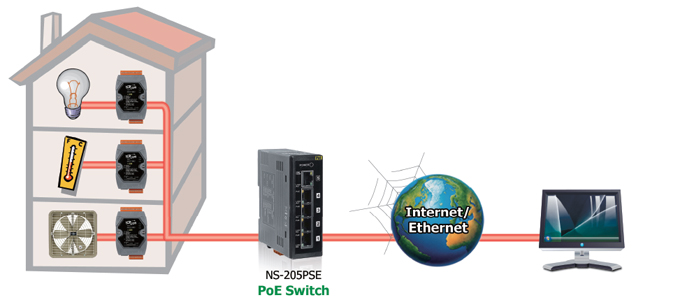
Furthermore, PET-7000 features "PoE" that not only data but also power is carried through an Ethernet cable. This feature makes installation of PET-7000 a piece of cake. Imagine that no more unnecessary wires, only an Ethernet cable takes care of everything in the field. |
|
|
| |
back |
|
|
|
|
| |
|
|
| |
|
|
| |
| Building Automation, Factory Automation, Machine Automation, Remote Maintenance, Remote diagnosis, Testing Equipment. |
 |
|
|
| |
back |
|
|
|
|
| |
|
|
| |
|
|
| |
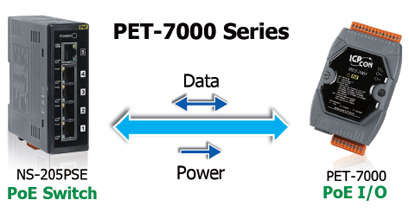
1. Power over Ethernet (PoE)
The PET-7000 series module can be powered by an IEEE802.3af compliant PoE switch. Both data and power can be carried by an Ethernet cable eliminating the need for additional wiring and power supply. |
 |
|
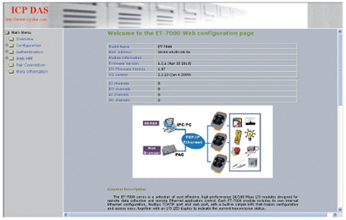
2. Built-In Web Server
Each ET-7000/PET-7000 module has a built-in web server that allows the users to easily configure, monitor and control the module from a
remote location using a regular web browser. |
 |
| |
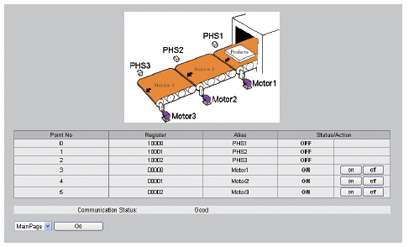
3. Web HMI
The Web HMI function allows the users to create dynamic and attractive web pages to monitor and control the I/O points. Users can
upload specific I/O layout pictures (bmp, jpg, gif format) and define a description for each I/O point. No HTML or Java skills are needed to create the web pages.
|
 |
|
4. Communication Security
Account and password are needed when logging into the ET-7000 web server. An IP address filter is also included, which can be used to allow or deny connections with specific IP addresses.
5. Modbus/TCP, Modbus/UDP Protocol
The Modbus/TCP, Modbus/UDP slave function on the Ethernet port can be used to provide data to remote SCADA software.
6. Built-In I/O
Various I/O components are mixed with multiple channels in a single module, which provides the most cost effective I/O usage and enhances
performance of the I/O operations.
7. Dual Watchdog
The Dual Watchdog is consists of a Module Watchdog and a Communication Watchdog. The action of AO,DO are also associated to the Dual
Watchdog.
Module Watchdog is a built-in hardware circuit to monitor the operation of the module and will reset the CPU if a failure
occurs in the hardware or the software. Then the Power On Value of AO,DO will be loaded.
Communication Watchdog is a software function to monitor the communication between the host and the ET-7000/PET-7000 module. The
timeout of the communication Watchdog is proprgrammable, when the ET-7000/PET-7000 doesn't receive commands from the host for a while, the watchdog forces the AO,DO to pre-programmed Safe Value to prevent unpredicatable damage of the connected devices. |
| |
8. Power On Value & Safe Value
Besides setting by the set AO,DO commands, the AO,DO can be set
under two other conditions.
Power On Value: The Power On Value is loaded into the AO,DO under 3 conditions: power on, reset by Module Watchdog, reset by reset command.
Safe Value: When the Communication Watchdog is enabled and a Communication Watchdog timeout occurs, the "safe value" is loaded into the AO,DO.
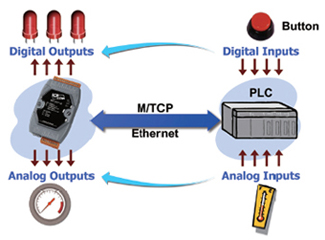
9. I/O Pair Connection
This function is used to create a AI/DI to AO/DO pair through the Ethernet. Once the configuration is completed, the ET-7000/PET-7000 module can poll the status of remote AI/DI devices and then use the Modbus/TCP protocol to continuously write to a local AO/DO channels in the background. |
 |
| |
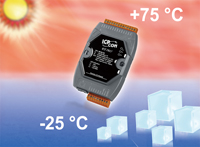
10. Highly Reliable Under Harsh Environment
- Operating Temperature: -25 ~ +75 °C
- Storage Temperature: -30 ~ +80 °C
- Humidity 10 ~ 90% RH (non-condensing)
|
 |
|
|
|
|
|
|
| |
back |
|
|
|
|
| |
|
|
|