
Search: Product Update
Win-GRAF PAC New Application: eLogger HMI + Win-GRAF SoftLogic
Product Update
2017-06-28
Looking for an affordable, high-quality solution for HMI and device control?
For many years, ICP DAS, has continued to make steady progress by tailoring a wide variety of products targeted at individual industries in order to meet the needs of specific customers. For users can real-time master the system procedures or rapidly solve the problem on devices in urgent cases. Consequently, ICP DAS provides the Win-GRAF Solution that can be implemented the perfect monitoring with zero-distance via a browser on a Smart Phone, a Tablet, or a Laptop.Affordable, High-quality Monitoring solution:
- IEC 61131-3 PLC Controller: WP-5238-CE7
- PLC SoftLogic Software: Win-GRAF
- HMI & Web Server Designer: eLogger (Free!)
- A wide range of Remote I/O Modules (Modbus TCP, Modbus RTU/ASCII, DCON)
 ICP DAS is the general agent for InduSoft in the Greater China region, and we highly recommend that you take advantage of this powerful SCADA software. Please contact us for more information, or visit: https://www.icpdas.com/en/product/guide+Software+InduSoft+InduSoft
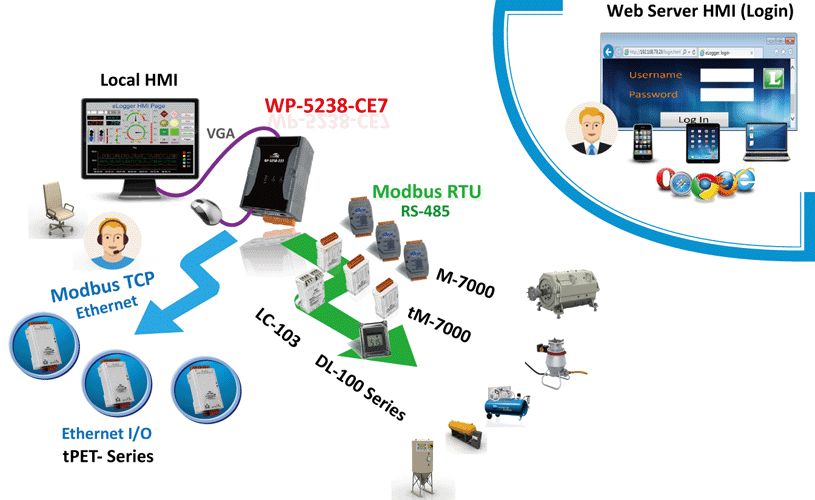
Beneath its deceptively small exterior, the WP-5238-CE7 contains a powerful and flexible soul based on Win-GRAF. By taking a creative approach, system designers can utilize Win-GRAF and eLogger HMI to construct an easy to use monitoring system to achieve device control. Compared with the traditional way, the Win-GRAF program and the local/web HMI can operate within a single Win-GRAF PAC. Moreover, users can log into the Web Server and monitor the web HMI by using a smart phone, a tablet, or a laptop.
The following is a detailed overview of the ICP DAS solution:
WinPAC series PAC : WP-5238-CE7
ICP DAS has recently launched the WP-5238-CE7, and is the most cost-effective Windows CE-based PAC, including an embedded Windows CE 7.0 operating system, a range of connectivity options (VGA, USB, Ethernet, RS-232 /RS-485), and an I/O expansion bus that can support a single XV board. The WP-5238-CE7 uses an industry standard 24 V power input, and can be installed where space is limited using DIN-Rail mounting.
With a Built-in Web Server, Allowing Remotely Control the Web HMI
The WP-5238-CE7 has a built-in web server which provides remote login service. The user can design the web HMI and set a username /password for logging, and then upload the project to the PAC. Further, users can log into the web server and supervise the web HMI through a browser on a smart handheld device at anywhere, anytime to instant grasp of device information.
WP-5238-CE7 support multiple Modbus protocol
For the upper layer (Client), the WP-5238-CE7 supports the Modbus TCP and Modbus RTU protocols and allows it to be connected to common SCADA software, such as InduSoft, iFix, InTouch, Wizon or Citect, etc. A single WP-5238-CE7 provides connections to 1 to 32 hosts (up to a maximum of 64).
For the lower layer (Equipment), the WP-5238-CE7 supports the following protocols:
- Modbus RTU/ASCII:
You can choose from any of the ICP DAS M-7000 series I/O modules, DL-100 temperature and humidity meters, tM series I/O modules, LC series lighting control modules or Wireless ZigBee I/O modules. Other brands of I/O devices that support the Modbus RTU/ASCII protocol can also be selected.
- DCON:
You can choose from any of the ICP DAS I-7000 series I/O modules, which all support the DCON protocol.
- Modbus TCP:
The WP-5238-CE7 can be used as a Modbus TCP Master to connect to a wide range of Modbus TCP Slave devices. This means that you can choose from any of the ICP DAS ET-7000 and tET series I/O modules, or use the ICP DAS tGW-700 series Modbus TCP to RTU/ASCII gateway to expand the remote device network.
- User-Defined Protocol:
The embedded ISaGRAF Driver in the WP-5238-CE7 allows you to create custom protocols by using RS-232/422/485 communication function blocks (such as COM_open or COM_status and so on), and then implementing them on the corresponding devices.
I/O Expansion
The WP-5238-CE7 allows you to expand the local I/O connection options by attaching a single XV series board. You can currently choose from the models indicated below, or visit our official web page https://www.icpdas.com/en/product/guide+Remote__I_O__Module__and__Unit+PAC__%EF%BC%86amp;__Local__I_O__Modules+XV-board to find the new XV-board.| Model | Channels | ItemC | ItemD | |
|---|---|---|---|---|
| DI | DO | AI | AO | |
| XV107/XV107A | 8 | 8 | - | - |
| XV110 | 16 | - | - | - |
| XV111/XV111A | - | 16 | - | - |
| XV306 | 4 | 4 | 4 | - |
| XV307 | - | 2 | ||
| XV308 | DI+DO=8 | - | - | |
| XV310 | 4 | 4 | 4 | 2 |
SoftLogic Software – Win-GRAF
When using Win-GRAF software, the WP-5238-CE7 supports a range of IEC 61131-3 standard PLC programming languages, including Quick Ladder (LD), Function Block Diagram (FBD), Sequential Function Chart (SFC), Structured Text (ST), and so on, which enables you to quickly design and develop dynamic and user-friendly custom applications.HMI Designer - eLogger
eLogger is a free charge and an easy-to-use HMI software platform developed by ICP DAS. It can be used to design the Web Server HMI for remotely controlling the PAC through a web browser on your PC or smart handheld devices. With Win-GRAF software, it is easy to create a professional monitoring application without requiring any complex programming skills or knowledge.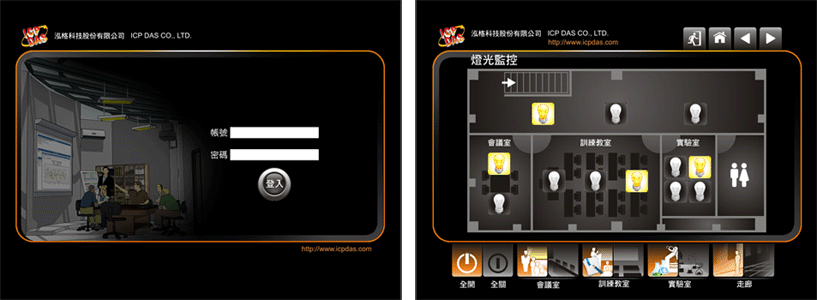
As you can see, ICP DAS, has meticulously designed the most cost-effective combination for you. By selecting the Win-GRAF PAC WP-5238-CE7, you can instantly improve your monitoring system using an economical solution, while enhancing your competitiveness within your industry.
Related Products
Software- SoftLogic Software: Win-GRAF
- HMI & Web Server Designer: eLogger
For more information on How to Use Win-GRAF SoftLogic and eLogger HMI in the Win-GRAF PAC?
Visit: www.icpdas.com > Support > FAQ > Win-GRAF Soft-Logic PAC > FAQ-018
Hardware
- Win-GRAF PAC : WP-5238-CE7
- XV-board (DI, DO, AI, AO)
- Remote I/O Modules (Modbus TCP, Modbus RTU/ASCII, DCON)
More ICP DAS Win-GRAF Products Information:
Win-GRAF WebsiteICP DAS > Product > Solutions > Soft PLC, Win-GRAF, ISaGRAF & eLogger HMI > Win-GRAF
Win-GRAF PAC WebPage
Win-GRAF > Win-GRAF PAC (Select the product model)
Win-GRAF Presentation/Data Sheet/Manual
Win-GRAF > Documents – Presentation、Data Sheet、Manual
Win-GRAF Driver/Workbench/FAQ
Win-GRAF > Software/Support – Driver/Workbench, FAQ