
Search: EOL
TPD-283, TPD-283-BK
EOL
2017-03-23
EOL notification date: 2017/03/23
Phased out model: TPD-283, TPD-283-BK
Last Order Date: 2017/03/31
Dear Partners,
ICP DAS hereby formally announces the manufacturing discontinue and End of Life (EOL) of TPD-283 and TPD-283-BK.
Within the effective warranty period, ICP DAS is committed to continue providing comprehensive after-sales service and technical support.
● Reason for termination: Phase out of MCU
● Suggested replacement device: TPD-283-H
- Status: Available
- Please refer to the following table for cross reference information.
| Model Name | TPD-283, TPD-283-BK | TPD-283-H |
| Product Status | Phased out | Available |
| CPU | 32-bit RISC CPU | 32-bit RISC CPU |
| Real Time Clock (RTC) | - | - |
| Buzzer | Yes | Yes |
| Rotary Switch (0~9) | Yes | Yes |
| LCD | 2.8 TFT (Resolution 240 x 320 x 16) |
2.8 TFT (Resolution 240 x 320 x 16) |
| Serial Port | RS-485 (including Self-Tuner) | RS-485 (including Self-Tuner) |
| Ethernet | RJ-45 x 1, 10/100 Base-TX | RJ-45 x 1, 10/100 Base-TX |
| Powered from PoE | IEEE 802.3af, Class1 (48 V) | IEEE 802.3af, Class1 (48 V) |
| Reset Button | Yes | Yes |
Migrate projects from TPD-283U to TPD-283U-H:
1. Open original project by using HMIWorks v2.10.11 or last version.
2. Click the HMIWorks menu item "HMI/Project Configuration".
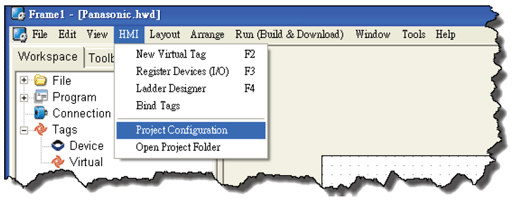
3. Click the "General" page.
4. Change the "TouchPAD Type" to TPD-283U-H.
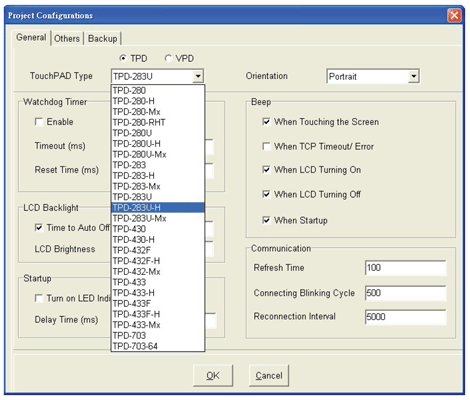
5. Click "OK" button.
For more information, please visit the link below: https://www.icpdas.com/en/product/TPD-283-H