
Search: EOL
TPD-433F
EOL
2017-11-17
EOL notification date: 2017/11/17
Phased out model: TPD-433F
Last Order Date: Subject to availability (limited in quantity while stocks last)
Dear Partners,
ICP DAS hereby formally announces the manufacturing discontinue and End of Life (EOL) of TPD-433F.
Within the effective warranty period, ICP DAS is committed to continue providing comprehensive after-sales service and technical support.
● Reason for termination: Phase out of MCU
● Suggested replacement device: TPD-433F-H
- Status: Available
- Please refer to the following table for cross reference information.
Migrating projects from TPD-433F to TPD-433F-H:
1. Open original project by using HMIWorks v2.10.22 or last version.
2. Click the HMIWorks menu item "Project/Project Configuration".
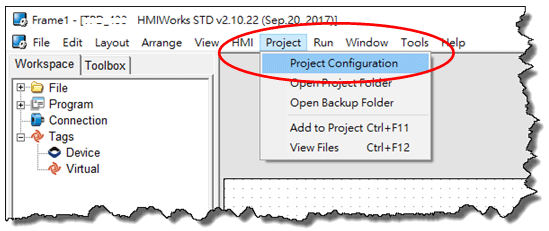
3. Click the "General" page and select the “TPD” option.
4. Change the "TouchPAD Type" to TPD-433F-H.

If your original project uses Ladder program, and is created by HMIWorks v2.09.09 or older versions, please follow the steps 5 - 6 to disable the new Ladder mode.
New ladder mode: The Coil-Set and Coil-Reset change the coil state and lock it (industrial standard) until reset or set. Other coil operations will not unlock or change it.
Old ladder mode: There is no lock feature.
5. Click the "Others" page.
6. Unchecked the "Use New Ladder Implementation” item in the “Ladder” pane.
7. Click "OK" button.
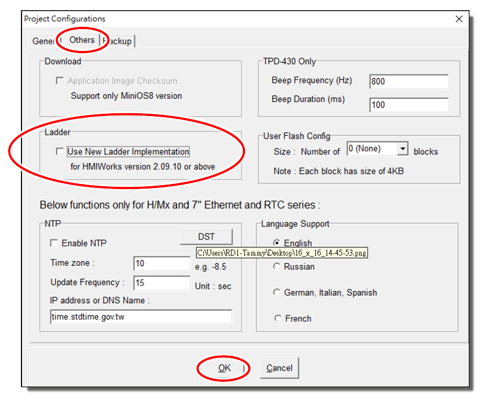
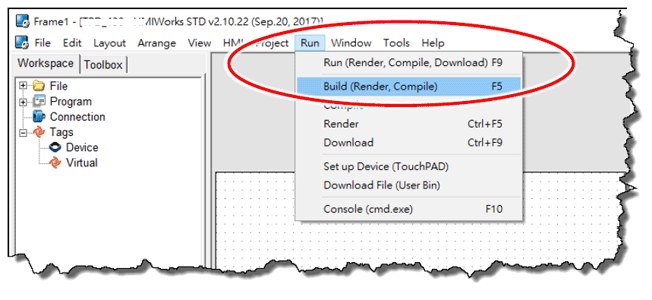
8. Click the HMIWorks menu item "Run/Build (Render, Compile)" to rebuild project or press F5.
For more information, please visit the link below:
https://www.icpdas.com/root/product/solutions/hmi_touch_monitor/touchpad/tpd-43xf-h.html
Phased out model: TPD-433F
Last Order Date: Subject to availability (limited in quantity while stocks last)
Dear Partners,
ICP DAS hereby formally announces the manufacturing discontinue and End of Life (EOL) of TPD-433F.
Within the effective warranty period, ICP DAS is committed to continue providing comprehensive after-sales service and technical support.
● Reason for termination: Phase out of MCU
● Suggested replacement device: TPD-433F-H
- Status: Available
- Please refer to the following table for cross reference information.
| Model Name | TPD-433F | TPD-433F-H |
| Product Status | Phased out | Available |
| CPU | 32-bit RISC CPU | 32-bit RISC CPU |
| MiniOS8 | Yes (update required) | - |
| Memory Expansion | 16 MB SDRAM/8 MB Flash | 16 MB SDRAM/16 MB Flash |
| Real Time Clock (RTC) | Yes | Yes |
| Buzzer | Yes | Yes |
| Rotary Switch (0~9) | Yes | Yes |
| LCD | 4.3 TFT (Resolution 480 x 272, 65536 colors) | 4.3 TFT (Resolution 480 x 272, 65536 colors) |
| Serial Port | COM1: RS-485 COM2: RS-232 |
COM1: RS-485 COM2: RS-232 |
| Firmware updates | USB 1.1 Client | USB 1.1 Client or Ethernet |
| Ethernet | RJ-45 x 1, 10/100 Base-TX | RJ-45 x 1, 10/100 Base-TX |
| Powered from PoE | IEEE 802.3af, Class1 (48 V) | IEEE 802.3af, Class1 (48 V) |
| Powered from Terminal Block | +10 ~ +30 VDC | +12 ~ +48 VDC |
| Reset Button | Yes | Yes |
Migrating projects from TPD-433F to TPD-433F-H:
1. Open original project by using HMIWorks v2.10.22 or last version.
2. Click the HMIWorks menu item "Project/Project Configuration".
3. Click the "General" page and select the “TPD” option.
4. Change the "TouchPAD Type" to TPD-433F-H.
If your original project uses Ladder program, and is created by HMIWorks v2.09.09 or older versions, please follow the steps 5 - 6 to disable the new Ladder mode.
New ladder mode: The Coil-Set and Coil-Reset change the coil state and lock it (industrial standard) until reset or set. Other coil operations will not unlock or change it.
Old ladder mode: There is no lock feature.
5. Click the "Others" page.
6. Unchecked the "Use New Ladder Implementation” item in the “Ladder” pane.
7. Click "OK" button.
8. Click the HMIWorks menu item "Run/Build (Render, Compile)" to rebuild project or press F5.
For more information, please visit the link below:
https://www.icpdas.com/root/product/solutions/hmi_touch_monitor/touchpad/tpd-43xf-h.html